Populate your own custom properties on SC VMM 2012
I have been helping a customer to populate their VMM 2012 console with information that they think is good to have, I have made a blog post about this some time ago but now I have added some new valuable information.
The information I retrive are where the VM resides on what CSV volume, if the VM has dynamic VHD´s, if the VM has snapshots and if the snapshots also have been merged, this can only happen when the VM is in Saved State or Stopped on a Win 2008 R2 Hyper-V (this is not an issue on a win 2012 hyper-v as it can live merge)
First I add the Custom Properties
New-SCCustomProperty -Name "DynamicVHD" -AddMember "VM"
New-SCCustomProperty -Name "Snapshots" -AddMember "VM"
New-SCCustomProperty -Name "Datastore" -AddMember "VM"
Here is a screenshot how it looks when you add the custom properties to the console,
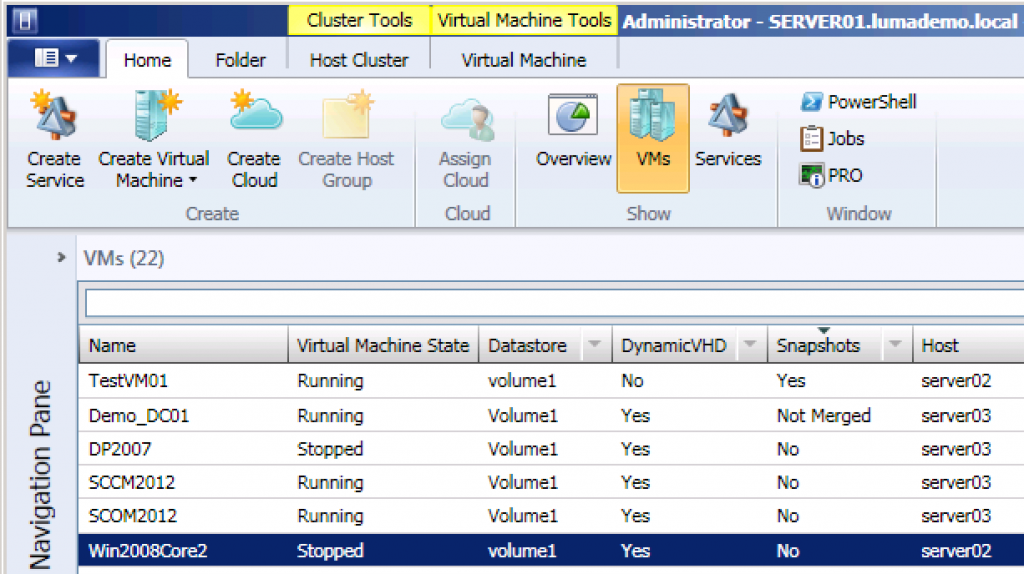
In the powershell script I iterate down through all the snapshots/differencing disks to the parent VHD and check if that is fixed or dynamic. And as you see in the image I check if there is a snapshot or a removed but not merged snapshot (I still have a small problem with the VMM name Checkpoint 😉 )
# Update custom items Snapshots and Dynamic disks, Datastore
#
# Niklas Akerlund / Lumagate 2012-12-17
if (-not (Get-Module virtualmachinemanager)) {
    Import-Module virtualmachinemanager
}
Get-SCVMMServer -ComputerName localhost | Out-Null

$VMs = Get-VM

foreach ($VM in $VMs){
    $Datastore = " "
    $LocationProp = Get-SCCustomProperty -Name "Datastore"
    $SnapShots = Get-SCCustomProperty -Name "Snapshots"
    $VHDs = $VM | Get-VirtualHardDisk
    $DynDisk = Get-SCCustomProperty -Name "DynamicVHD"
    $Dyn = $false
    $Merge = $false

    foreach ($VHD in $VHDs){

        if ($VHD.VHDType -eq "DynamicallyExpanding"){
            $Dyn = $true
        }
        if (($VHD.Location -like "*.avhd") -and (($VM | Get-SCVMCheckpoint) -eq $null)){
                $Merge = $true
        }
        $VHDp = $VHD
        while ($VHDp.ParentDisk -ne $Null){
            $VHDp = $VHDp.ParentDisk
            if($VHDp.VHDType -eq "DynamicallyExpanding"){
                $Dyn = $true
            }

        }

    }
    # Update custom values
    $Datastore = $VM.Location.Split("\")[2]
    Set-SCCustomPropertyValue -InputObject $VM -CustomProperty $LocationProp -Value $Datastore
    if ($Dyn){
        Set-SCCustomPropertyValue -InputObject $VM -CustomProperty $DynDisk -Value "Yes"
    }else{
        Set-SCCustomPropertyValue -InputObject $VM -CustomProperty $DynDisk -Value "No"
    }

    if ($VM | Get-SCVMCheckpoint){
        Set-SCCustomPropertyValue -InputObject $VM -CustomProperty $SnapShots -Value "Yes"
    }elseif($Merge){
        Set-SCCustomPropertyValue -InputObject $VM -CustomProperty $SnapShots -Value "Not Merged"
    }else{
        Set-SCCustomPropertyValue -InputObject $VM -CustomProperty $SnapShots -Value "No"
    }

}
As I described in the earlier post you can schedule this to run with scheduled tasks and maybe set it to run every hour or what ever you might prefer.
Comments
[…] komplett und vor allem auch aktuell zu halten. Eine ebenfalls sehr interessante Lösung hat Niklas Åkerlund beschrieben. Er beschreibt da eine Lösung wie hilfreiche Informationen zu Storage und Snapshots […]