A PowerCLI function to manage VMware vSphere Licenses
As always ( or at least in my world) you should do everything in powershell/powerCLI. Now the turn comes to handling licensing in VMware vSphere.
I searched the web and found some information from Luc Dekens post and from Joe Keegan post. I also used the Onyx VMware fling to get some more functionality.
I decided to do some powershell functions and came up with the following, I have created three functions that can do some magic with your licenses
- Get-vLicense – query the vCenter for licenses
- Add-vLicense – add a license or assign an existing license to a host/vCenter
- Remove-vLicense – remove a license that is not in use
Of course there might be other things regarding licensing i have forgot but see this as a version 0.1 and that you can give me input on what to add or change
Here you can see how the function get the information:
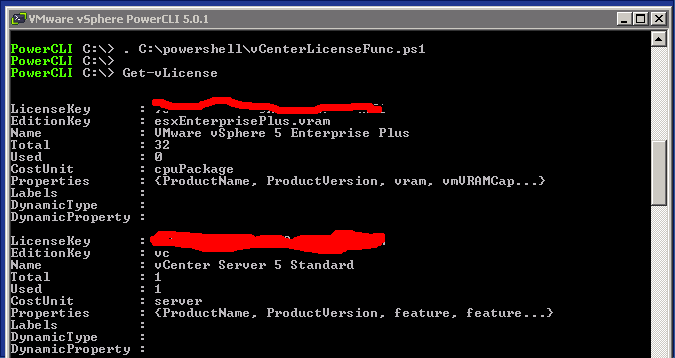
You have to bare with me and my paintbrush skills, but I cannot show my license keys on the Internet 🙂
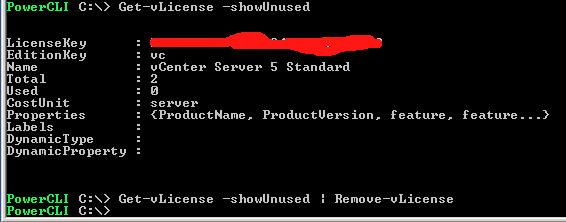
I can also use a switch to just show the ones that are not used with
Get-vLicense -showUnused
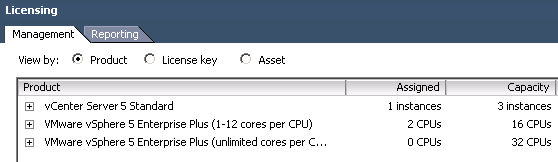
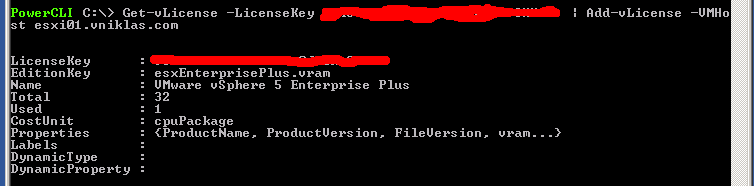
I would like to move my hosts to the new license that i have that has unlimited cores
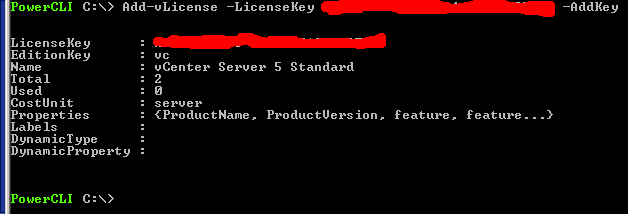
I can also in the Add function just add without assigning the license right now just use the -AddKey switch
And if I want to remove the unused license I use the following function, It can utilize a pipeline parameter as you see
And here is the whole code for the functions:
function Get-vLicense{
<#
.SYNOPSIS
Function to show all licenses  in vCenter

.DESCRIPTION
Use this function to get all licenses in vcenter

.PARAMETER  xyz

.NOTES
Author: Niklas Akerlund / RTS
Date: 2012-03-28
#>
	param (
		[Parameter(ValueFromPipeline=$True, HelpMessage="Enter the license key or object")]$LicenseKey = $null,
		[Switch]$showUnused,
		[Switch]$showEval
		)
	$servInst = Get-View ServiceInstance
	$licenceMgr = Get-View $servInst.Content.licenseManager
	if ($showUnused -and $showEval){
		$licenses = $licenceMgr.Licenses | where {$_.EditionKey -eq "eval" -or $_.Used -eq 0}
	}elseif($showUnused){
		$licenses = $licenceMgr.Licenses | where {$_.EditionKey -ne "eval" -and $_.Used -eq 0}
	}elseif($showEval){
		$licenses = $licenceMgr.Licenses | where {$_.EditionKey -eq "eval"}
	}elseif ($LicenseKey -ne $null) {
		if (($LicenseKey.GetType()).Name -eq "String"){
			$licenses = $licenceMgr.Licenses | where {$_.LicenseKey -eq $LicenseKey}
		}else {
			$licenses = $licenceMgr.Licenses | where {$_.LicenseKey -eq $LicenseKey.LicenseKey}
		}
	}
	else {
		$licenses = $licenceMgr.Licenses | where {$_.EditionKey -ne "eval"}
	}

	$licenses
}

function Add-vLicense{
<#
.SYNOPSIS
Add New Licenses to the vCenter license manager

.DESCRIPTION
Use this function to add licenses  and assing to either the vcenter or the hosts

.PARAMETER  xyz

.NOTES
Author: Niklas Akerlund / RTS
Date: 2012-03-28
#>
param (
	$VMHost ,
	[Parameter(ValueFromPipeline=$True)]$License = $null,
	[string]$LicenseKey = "XXXXX-XXXXX-XXXXX-XXXXX-XXXXX",
	[switch]$AddKey
    )
	$LicenseMgr = Get-View -Id 'LicenseManager-LicenseManager'
	$LicenseAssignMgr = Get-View -Id 'LicenseAssignmentManager-LicenseAssignmentManager'
	if($License){
		$LicenseKey = $License.LicenseKey
		$LicenseType = $LicenseMgr.DecodeLicense($LicenseKey)
	}else{
		$LicenseType = $LicenseMgr.DecodeLicense($LicenseKey)
	}

	if ($LicenseType) {
		if ($AddKey){
			$LicenseMgr.AddLicense($LicenseKey, $null)
		}else{
			if ($LicenseType.EditionKey -eq "vc"){
				#$servInst = Get-View ServiceInstance
				$Uuid = (Get-View ServiceInstance).Content.About.InstanceUuid
				$licenseAssignMgr.UpdateAssignedLicense($Uuid, $LicenseKey,$null)
			} else {
				$key = Get-vLicense -LicenseKey $LicenseKey
				if($key  -and ($key.Total-$key.Used) -lt (get-vmhost $VMHost | get-view).Hardware.CpuInfo.NumCpuPackages){
					Write-Host "Not Enough licenses left"
				} else{
					$Uuid = (Get-VMhost $VMHost | Get-View).MoRef.Value
					$licenseAssignMgr.UpdateAssignedLicense($Uuid, $LicenseKey,$null)
				}
			}
		}
	}
}


function Remove-vLicense{
<#
.SYNOPSIS
Function to remove a licenses that is not in use in vCenter

.DESCRIPTION
Use this function to remove a license

.PARAMETER  xyz

.NOTES
Author: Niklas Akerlund / RTS
Date: 2012-03-28
#>
param (
	[Parameter(Position=0, Mandatory=$true, ValueFromPipeline=$True, HelpMessage="Enter the key or keyobject to remove")]$License
	)
	$LicObj = Get-vLicense $License
	if($LicObj.Used -eq 0){
		$LicenseMgr = Get-View -Id 'LicenseManager-LicenseManager'
		$LicenseMgr.RemoveLicense($LicObj.LicenseKey)
	}else{
		Write-Host " The license is assigned and cannot be removed"
	}
}
Comments
Hi,
Very good functions !
But I don’t know how to add license for my vCloud Networking & Security extension.
How could I find its UUID ?
Thanks !
Big thanks! really helps to add licenses, exactly what I was looking for!
Amazing script, thanks a lot. I prefer to apply new licensing for all ESXi in datacentrename
get-vmhost -Location datacentrename | ForEach-Object {Add-vLicense $_.name -LicenseKey ******************************}
I had some issue with essentials edition, but fixed it replacing line 75 with :
if ($LicenseType.EditionKey -like “vc*”){
to catch vc.essentials.instance type.
Great script ! thanks !
Hello,
Thx for this usefull script !
I can’t find the name that we manually set while adding a license.It’s the filed callled “license” in the GUI. This is required for me to find back the correct license to use. Is there anyway to find it with your function ? I checked also the advanced properties from your script but it does not show the field with the name.
Thx