Updated VMware vSphere FT (Fault Tolerance) function for PowerCLI
After this week when i have been co-teaching a VMware vSphere ICM course i was going to show the students FT and I was seeking in the powerCLI reference for some cmdlets but could not find any.
I created my own function for enabling this, i got inspiration from Cody Bunch post but extended it with a function and also with my function you can disable/enable/remove and test restart/failover the secondary vm. I also check if the FT is enabled or not before making any changes.
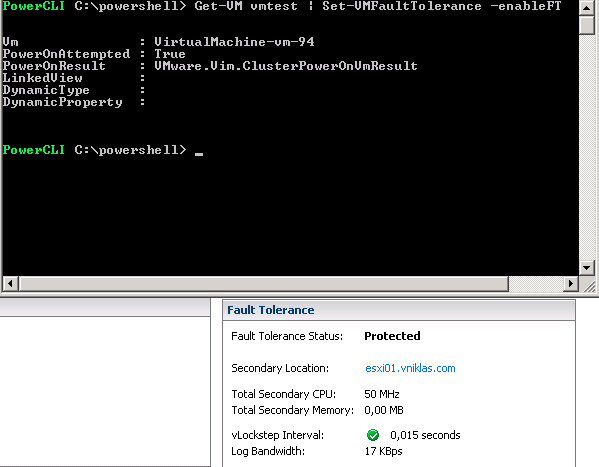
Here is the PowerCLI function, i am using some Get-View to be able to use the FT functions.
Updated: Today (Monday 27/2) i added functionality with a possibility to also send VMHost as argument, but then i realized some errors occuring, my assumtions that the primary VM always was the first object when doing a Get-VM was false, i have corrected the function that it actually checks for the correct VM, Primary or Secondary. If you do not send VMHost parameter the FT process will choose a Host for you, this cannot be the same as the Primary VM resides on.
function Set-VMFaultTolerance{
<#
.SYNOPSIS
Enable FT for the VM sent as parameter

.DESCRIPTION
Use this function to enable or disable Fault Tolerance

.PARAMETER  xyz

.NOTES
Author: Niklas Akerlund / RTS
Date: 2012-02-27
#>
    param (
   [Parameter(Position=0,Mandatory=$true,HelpMessage="A virtual machine",
    ValueFromPipeline=$True)]
    $VM,
	$VMHost = $null,
	[switch]$enableFT,
	[switch]$disableSecondaryFT,
	[switch]$removeFT,
	[switch]$failOverFT,
	[switch]$restartSecondaryFT
    )
	if ($VM.ExtensionData.Config.FtInfo -ne $null){
		$VM = Get-VM $VM | where {$_.Extensiondata.Config.FtInfo.Role -eq 1}
	} else {
		$VM = Get-VM $VM
	}
	if ($VMHost -ne $null){
		$VMHost = Get-VMHost $VMHost | Get-View
		if ($VMHost -ne $null) {
			$VMHostobj = New-Object VMware.Vim.ManagedObjectReference
			$VMHostobj.type = "HostSystem"
			$VMHostobj.value = $VMHost.MoRef.Value
			$VMHost = $VMHostobj
		}
	}

	if ($enableFT) {
		if ($VM.ExtensionData.Config.FtInfo -eq $null){
			$VMview = $VM | Get-View
			$VMview.CreateSecondaryVM($VMHost)
		} else{
			$VMsec = Get-VM $VM.Name | where {$_.Extensiondata.Config.FtInfo.Role -eq 2}| Get-View
			$VMobj = New-Object VMware.Vim.ManagedObjectReference
			$VMobj.type = "VirtualMachine"
			$VMobj.value = $VMsec.MoRef.Value
			$VMview = $VM | Get-View
			$VMview.EnableSecondaryVM($VMobj, $null)
		}
	}elseif ($disableSecondaryFT) {
		if ($VM.ExtensionData.Config.FtInfo -ne $null){
			$VMsec = Get-VM $VM.Name | where {$_.Extensiondata.Config.FtInfo.Role -eq 2 -and $_.PowerState -eq "PoweredOn"}| Get-View
			if ($VMsec -ne $null){
				$VMobj = New-Object VMware.Vim.ManagedObjectReference
				$VMobj.type = "VirtualMachine"
				$VMobj.value = $VMsec.MoRef.Value
				$VMview = $VM | Get-View
				$VMview.DisableSecondaryVM($VMobj)
			}else {
				Write-Host "The Secondary is already disabled"
			}
		}else {
			Write-Host "This VM is not FT enabled"
		}
	}elseif ($failOverFT) {
		if ($VM.ExtensionData.Config.FtInfo -ne $null){
			$VMsec = Get-VM $VM.Name | where {$_.Extensiondata.Config.FtInfo.Role -eq 2 -and $_.PowerState -eq "PoweredOn"}| Get-View
			if ($VMsec -ne $null){
				$VMobj = New-Object VMware.Vim.ManagedObjectReference
				$VMobj.type = "VirtualMachine"
				$VMobj.value = $VMsec.MoRef.Value
				$VMview = $VM | Get-View
				$VMview.MakePrimaryVM($VMobj)
			}else {
				Write-Host "The Secondary is disabled"
			}
		}else {
			Write-Host "This VM is not FT enabled"
		}
	}elseif ($restartSecondaryFT) {
		if ($VM.ExtensionData.Config.FtInfo -ne $null){
			$VMsec = Get-VM $VM.Name | where {$_.Extensiondata.Config.FtInfo.Role -eq 2 -and $_.PowerState -eq "PoweredOn"}| Get-View
			if ($VMsec -ne $null){
				$VMobj = New-Object VMware.Vim.ManagedObjectReference
				$VMobj.type = "VirtualMachine"
				$VMobj.value = $VMsec.MoRef.Value
				$VMview = $VM | Get-View
				$VMview.TerminateFaultTolerantVM($VMobj)
			}else {
				Write-Host "The Secondary is disabled"
			}
		}else {
			Write-Host "This VM is not FT enabled"
		}
	}elseif ($removeFT){
		if ($VM.ExtensionData.Config.FtInfo -ne $null){
			$VMview = Get-VM $VM | where {$_.Extensiondata.Config.FtInfo.Role -eq 1}| Get-View
			$VMview.TurnOffFaultToleranceForVM()
		} else {
			Write-Host "This VM is not FT enabled"
		}
	}

}
Comments
[…] http://www.rtfm-ed.co.uk/2012/02/28/passing-vcp5-just/An evolved “enable FT” PowerCLI function -http://vniklas.djungeln.se/2012/02/25/vmware-vsphere-ft-fault-tolerance-function-for-powercli/ESX System Analyzer (Pre-ESXi Upgrades, etc) – […]
hi Niklas, thanks for sharing that! But, how can i use it? I saved that in a file (for ex. ft.ps1) then tried to launch it, but it return nothing, nor errors. How i use it? thanks!
Hi!
What you have to do is load the function first,
. .\ft.ps1 (do not forget the space between the . .
then you should be able to use the Set-VMFaultTolerance from the console with appropriate -parameters 🙂
Great function, I was looking exactly for this!
[…] turning FT on and Off I used a PowerCLI function from vNiklas, it is part of the code […]