Convert Hyper-V vhd to vhdx and back with PowerShell
To convert an vhd disk file to vhdx superduper format with PowerShell you just use the cmdlet Convert-VHD (this work only on hyper-v enabled machines). I read Virtual PC Guys post about how to do it in the GUI and wanted to make a small post about how to do it in powershell
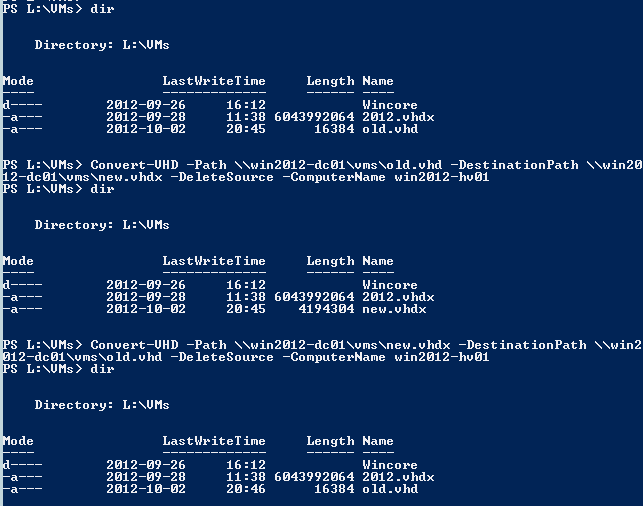
Convert-VHD -Path \\win2012-dc01\vms\old.vhd -DestinationPath \\win2012-dc01\vms\new.vhdx -DeleteSource -ComputerName win2012-hv01
And to go back
Convert-VHD -Path \\win2012-dc01\vms\new.vhdx -DestinationPath \\win2012-dc01\vms\old.vhd -DeleteSource -ComputerName win2012-hv01
And here is a screendump
And if I for example want to convert a number of vhd´s
first I create 5 dummy files, of course in the real life you have some files that already are there ready to be converted.
1..5|%{New-VHD -Path .\vhd$_.vhd -SizeBytes 2GB}
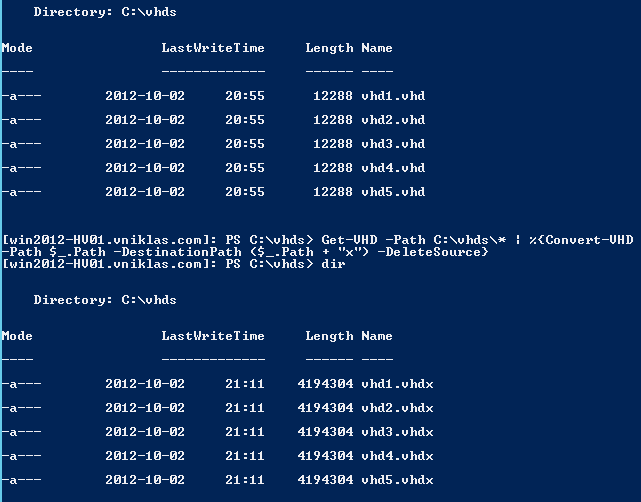
Get-VHD -Path C:\vhds\* | %{Convert-VHD -Path $_.Path -DestinationPath ($_.Path + "x") -DeleteSource}
olala look
If you want to convert back to vhd format you need to be sure that it is not bigger than 2040 GB or it will fail. Good luck!